Human Performance Tab
HumanPage · /api/human · HumanRunner · one keypress = one discrete action · habitat's own ruler · outputs/human/{split}
The Human tab puts a person in the exact seat the coding agents sit in: same env_habitat episodes, same discrete action space (0 = STOP, 1 = forward 0.25 m, 2/3 = turn 15°), same 512 px default render, and — the hard promise — the same ruler: every number on the tab comes from habitat's own measures via env_habitat__evaluate, computed by the same auto_host surface the agent drivers call, never browser-side. Human SR/SPL therefore sits directly against the standard board. The agent counterpart of this tab is the Coding-Agent Monitor; the experiment itself is described in the capability page.
The browser owns the control loop. One keypress becomes one POST /api/human/step; the runner translates it into the same auto_host HTTP calls the agent drivers make and hands the new egocentric frame back inline (base64 PNG) in the same response.
1. What it does
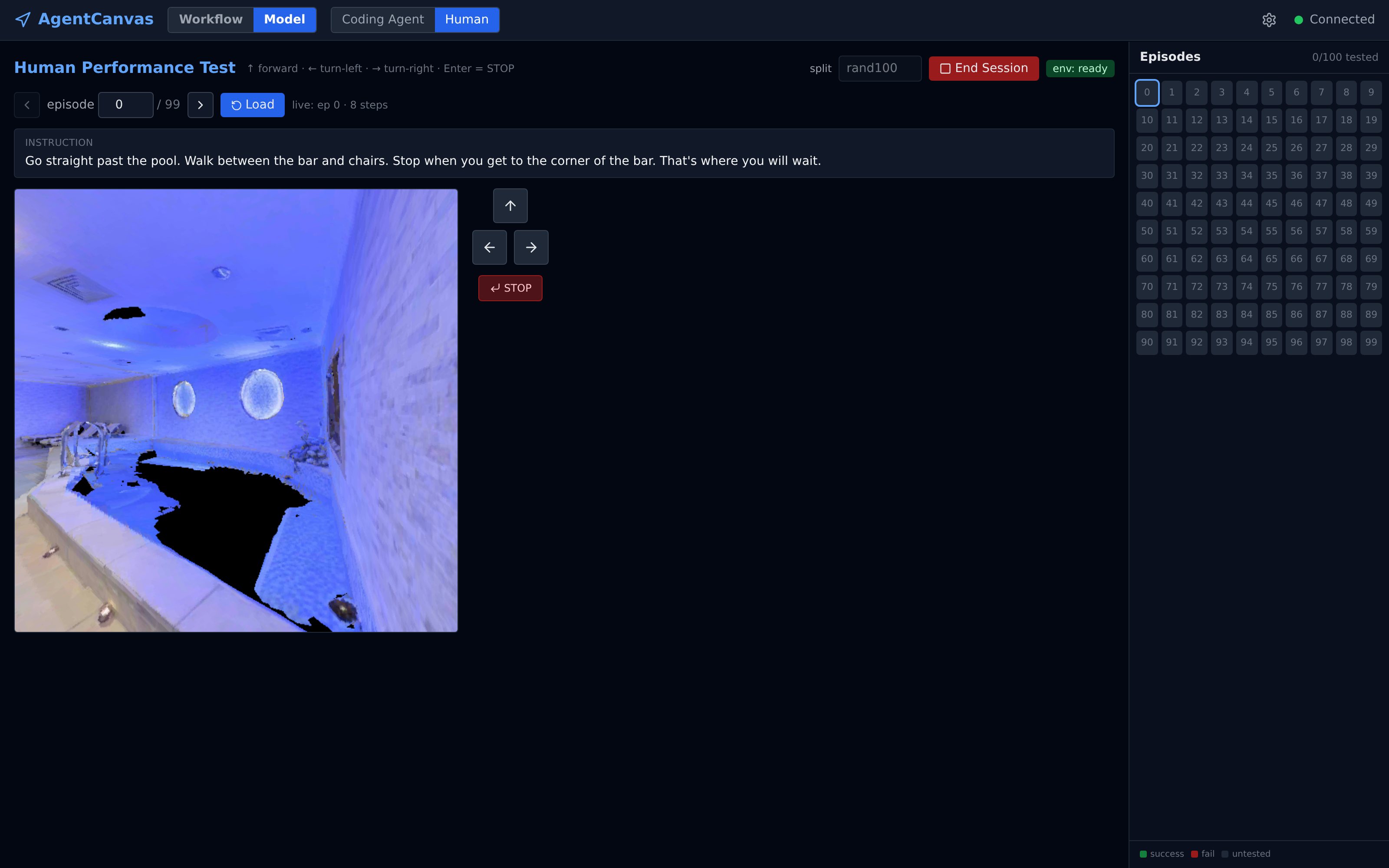
rand100), 8 steps in, after turning left toward the pool the instruction names. Left: the egocentric 512 px frame. Middle: the D-pad + STOP (Enter). Right: the tested/untested grid over all 100 episodes.It measures human performance on the benchmark the agents run. You pick an episode from the 100-cell grid (rand100 split), read the same instruction the agents get, walk the scene one discrete action at a time from the egocentric view, and press STOP when you believe you are at the goal. The env then scores you exactly as it scores an agent — SR, oracle SR, distance-to-goal, nDTW, SPL — and the tab keeps per-episode records plus a running aggregate. The whole session surface is four HTTP calls:
# 1. GPU up (blocks-then-polls; ~seconds for a warm scene cache)
curl -X POST :8000/api/human/start-server -d '{"split": "rand100"}'
# 2. place episode 7, get instruction + first frame (base64 PNG inline)
curl -X POST :8000/api/human/episode/7/load -d '{"rgb_resolution": 512}'
# 3. one keypress = one discrete action (1 fwd / 2 left / 3 right)
curl -X POST :8000/api/human/step -d '{"action": 1}'
# 4. STOP + evaluate + persist — habitat computes SR/OSR/NE/nDTW/SPL
curl -X POST :8000/api/human/stop
2. Session protocol — one lock, one session, driver-side everything
HumanRunner is a lifespan singleton owning at most one auto_host and one live episode; a threading.Lock serializes every env HTTP call with every session mutation (human_runner.py · HumanRunner).
- Server lifecycle —
start_serverreuses a live, health-checked auto_host or respawns fresh; the interpreter and source file come from the registry's discoveredenv_habitatnodeset (import boundary, mirroringCodingAgentRunner). Dataset + split are pushed once at spawn — a split push re-initializes the env against its YAML, the expensive part — and per-episode work only ever pushesepisode_indexafterwards (HumanRunner._spawn). The call is deliberately blocking on a pooledto_threadworker:PR_SET_PDEATHSIGfires when the spawning thread dies, so spawning from a short-lived thread would SIGTERM the env the instant that thread returned (HumanRunner.start_serverdocstring). - Episode session —
load_episode(i)(index gated to 0–99) arms the placed episode and returns instruction + first frame; re-loading a tested episode starts a fresh trajectory (the UI's "re-test", record overwritten on the next stop).step(a)accepts only 1/2/3, executesenv_habitat__step_discrete, observes the new frame + pose, and folds env-sideterminated/truncatedintodone(a budget truncation ends the episode without a human STOP,end_reason="budget"). - STOP + evaluation —
stop()issues action 0 if the episode is still live, then callsenv_habitat__evaluateand persists the record. STOP is not accepted throughstep()so the confirm gate and evaluation stay in one place (HumanRunner.stepraises on action 0). - Liveness —
server_status()health-probes outside the lock so a routine poll never blocks an in-flight step; a vanished auto_host folds into a recoverable error state whose message names the usual culprit (backend auto-reload) and the recovery (Start Session again).
3. Persistence & aggregate
Every action and trajectory coordinate is persisted; the aggregate is a plain mean over tested episodes. Under outputs/human/{split}/: episode_{i}.jsonl carries episode_meta (instruction, scene, start position, render resolution) plus one step/stop line per action (action name, position, orientation, terminated/truncated) and a final metrics line; summary.json holds one record per tested episode (metrics, step counts, called_stop, end_reason, wall time) with re-tests replacing their index in place, plus an aggregate that averages every numeric metric and num_steps over the tested set (human_runner.py · _persist_record / _aggregate).
4. The UI surface
The page is a thin, keyboard-first shell over the four endpoints (HumanPage.tsx): a split selector, a 100-cell episode grid with tested/success badges fed by GET /status, the egocentric frame with instruction overlay, a D-pad, and a metrics panel after STOP.
| Key | Action |
|---|---|
↑ | step(1) — forward 0.25 m |
← / → | step(2) / step(3) — turn 15° |
Enter | opens the STOP confirm (STOP is permanent, so it is never one keypress) |
Key events are ignored while a form field has focus, and movement keys are dead while a request is in flight (busy) or the episode is done — the browser enforces the one-action-at-a-time loop the runner's lock assumes.
5. Where it deviates from the agent protocol
end_reason="budget"). A human can also stare at a frame indefinitely. Human numbers are comparable on the metric ruler, not on the resource envelope.
aggregate averages whatever episodes have been tested (tested: N is printed beside it). Until all 100 are tested, comparing it against a full-board cell aggregate carries selection bias — you may have tested the easy ones first.
uvicorn --reload restarts the worker on any .py change and the PDEATHSIG-armed habitat subprocess dies with it. The tab surfaces this as a recoverable error with a Start-Session retry; the durable fix is running the backend without --reload (HumanRunner._DEAD_MSG).
6. Key files
| Piece | Where |
|---|---|
| Human page (tab) | agentcanvas/frontend/src/pages/human/HumanPage.tsx |
| REST router | agentcanvas/backend/app/api/execution/human.py |
| Runner service | agentcanvas/backend/app/services/human_runner.py |
| Artifacts | outputs/human/{split}/ — episode_{i}.jsonl + summary.json |